> ## Documentation Index
> Fetch the complete documentation index at: https://docs.smtpexpress.com/llms.txt
> Use this file to discover all available pages before exploring further.
# Project Credentials
> Connect to the SMTP Express API using your project credentials.
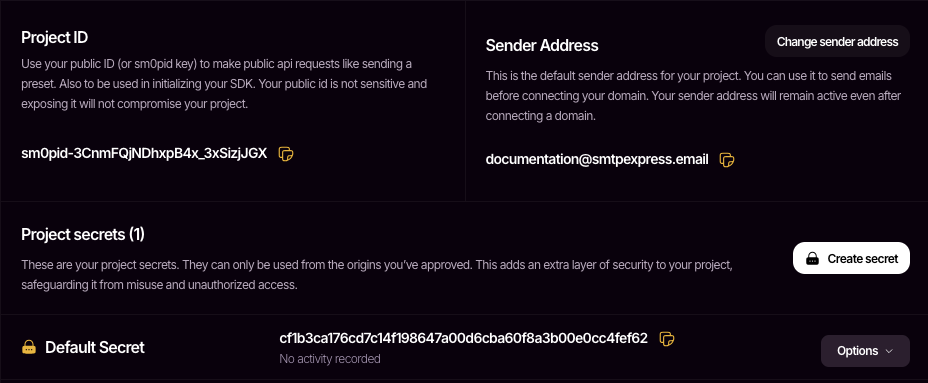
An SMTP Express project functions like a dedicated mail server. This enables you to send (transactional and promotional) and also receive emails. Each project on SMTP Express is assigned three key credentials: a `Sender Address`, `Project ID`, and `Project Secret`
> To find your credentials, navigate to Projects > Settings > Credentials.
 ***
## The Sender Address
Also known as the *From Address*, this is the email address used to send emails (literally). By default, a sender address is generated for every project in the format: `@smtpexpress.email`.
This address can be used to send and receive emails through SMTP Express. Additionally, a project's sender address can be changed by either setting a more recognizable username or [connecting a domain](/essentials/domains) which replaces `smtpexpress.email` with your own domain.
***
## The Project Secret
Project secrets are essentially your API keys and they are to be sent as Bearer Tokens when making your API Requests like so:
```shell cURL theme={null}
curl -XPOST 'https://api.smtpexpress.com/send'
-H 'Authorization: Bearer '
```
Every project comes with a default secret that you can copy and use immediately. If you need to generate a new one, use the `Create Secret` button.
***
## The Sender Address
Also known as the *From Address*, this is the email address used to send emails (literally). By default, a sender address is generated for every project in the format: `@smtpexpress.email`.
This address can be used to send and receive emails through SMTP Express. Additionally, a project's sender address can be changed by either setting a more recognizable username or [connecting a domain](/essentials/domains) which replaces `smtpexpress.email` with your own domain.
***
## The Project Secret
Project secrets are essentially your API keys and they are to be sent as Bearer Tokens when making your API Requests like so:
```shell cURL theme={null}
curl -XPOST 'https://api.smtpexpress.com/send'
-H 'Authorization: Bearer '
```
Every project comes with a default secret that you can copy and use immediately. If you need to generate a new one, use the `Create Secret` button.
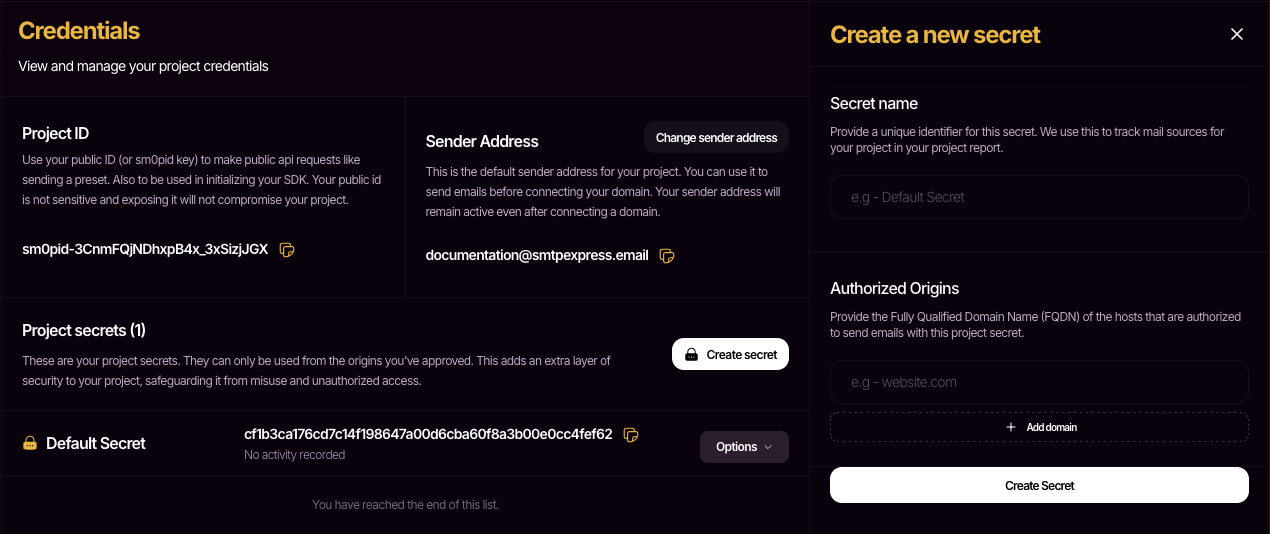 ### Authorized Origins
To secure your project secrets from misuse, we require every project secret to declare an origin in the form of a domain name.
Example values are: `localhost`, `app-name.netlify.app`, `website.com`. Be sure to replace with your actual origin when setting it up. Requests made from domains that are not listed under a secret's authorized origins will be denied.
***
## The Project ID
The Project ID is a unique public identifier for your project. Unlike secrets, it is designed to be safe for client-side exposure and is restricted to a limited set of API actions. Currently, it is only used with [Presets](/send/presets).
To use the Project ID in API requests, send it as a Bearer Token:
```shell cURL theme={null}
curl -XPOST 'https://api.smtpexpress.com/send'
-H 'Authorization: Bearer '
```
***
## Next Steps
Now that you understand how to authenticate and send emails with SMTP Express, explore more features to enhance your integration.
Personalize your sender address to match your business website.
Learn more about using the Send API to power your entire mailing activity.
### Authorized Origins
To secure your project secrets from misuse, we require every project secret to declare an origin in the form of a domain name.
Example values are: `localhost`, `app-name.netlify.app`, `website.com`. Be sure to replace with your actual origin when setting it up. Requests made from domains that are not listed under a secret's authorized origins will be denied.
***
## The Project ID
The Project ID is a unique public identifier for your project. Unlike secrets, it is designed to be safe for client-side exposure and is restricted to a limited set of API actions. Currently, it is only used with [Presets](/send/presets).
To use the Project ID in API requests, send it as a Bearer Token:
```shell cURL theme={null}
curl -XPOST 'https://api.smtpexpress.com/send'
-H 'Authorization: Bearer '
```
***
## Next Steps
Now that you understand how to authenticate and send emails with SMTP Express, explore more features to enhance your integration.
Personalize your sender address to match your business website.
Learn more about using the Send API to power your entire mailing activity.